
Digi Citizen
KELA
Kela takes care of people’s basic income in different kinds of situations, like when getting ill, being unempoyed or when retiring, for example. I myself am a student, and there are some services Kela has to offer for me. I can get financial aid from Kela in the form of study grant and government guarantee for student loan. Nowadays there is no need to go to the Kela office personally, as the services can be obtained through digital services at kela.fi. In Finland, we have a Kela card, that is needed when dealing with health services and it is used as in identification card in those matters.
As a student I’ve used Kela’s services quite often. I have received the student grant monthly so Kela’s website is quite familiar for me. When me and my fiance were younger we also had housing benefit from Kela, so I am aware of how it works. And families with children can have Child allowance through Kela’s service.
I already have a European heath care card, which is a social insurance card in Europe that you might need when traveling in Europe and are in a need of medical care.
OMAKANTA
Omakanta is citizen’s tool to view own health and well-being information. It is a part of national Kanta services. OmaKanta is an online service that Finnish citizens can use through www.kanta.fi by authenticating for example with banking account or mobile certification. The service contains sensitive personal data, and that’s why strong login is required. In OmaKanta one can see their own recipes, health information, social services information, welfare information, as well as different kinds of certificates and accesses. I find the service very useful, even thoug I am not always very pleased with its UI solutions.
KEVA
Keva is a public pension service. I happen to live right next to Keva’s office in Helsinki, so by chance I have become familiar with Keva’s services, even though I won’t be able to retire in decades. Keva is my pension service and logging into its digital services needs strong authentication too. I used my banking account to authenticate. From there I can see my different kinds of pension possibilities and even calculate my expected amount of my pension. There’s also a possibility to see how much you would get pension if you’d retire right now. Well, as being 34 years old at the moment, the monthly amount is not very huge 🙂 When it becomes relevant, I can apply for a pension through that service.I calculated my own retirement age, and it says I can retire between the age of 67 and 70, but however that’s just an estimate.
BOOKING.COM
in 2025 there ae numerous of different kinds of online services you can use, and benefit, when travelling. One of them is booking.com which, I assume, is quite familiar for most of us as the ads of the service can be seen very often also in television.
Bookin.com is an online service from where you can easily compare the prices for hotels, flight, taxes and even car rental services when booking. I compared a few hotel’s prices near me, comparing their prices through their own website and through booking.com. I live right next to Helsinki city center, so I took in comparison the prices of these hotels for the upcoming weekend:
Hotel Arthur
Price in booking.com: 117e
Price in their own website: 117,80e
Sokos Hotel Torni Helsinki
Price in booking.com: 191e
Price in their own website: 190e
Hobo Hotel Helsinki
Price in booking.com: 145e
Price in their own website: 136e
As we can see, now it happened to be so that it was mostly cheaper to book straight from the hotel’s own web site. Usually it depends a lot of the date that you’re booking, but this shows that there isn’t always that one place where you can save money the best. I have gotten used to the thing, that I go through a lot of different booking websites and compare the prices before I do any reservations.
MY FAVORITE APPLICATION
I chose an app callled HSL (Helsingin seudun liikenne) where you can buy ticket to public transport, see the timetables and look for road guides. Because I live right next to Kaisaniemi park, which is located right at the center of Helsinki city, I usually travel by walking. That’s the reason I dont very often buy seasonal ticket to public transport, and I usually use single ticket when needed.
HSL app is a very intuitive and friendly to use. Once you’ve registered in, it knows your personal details and possible rights to discounts, and when you’ve given your payment information, it is very quick to buy tickets when needed. I usually pay my tickets through MobilePay service on that.
The app also lets you discover the tram, bus and train lines, shows the maps, timetables and any possible disruptions or other announcements easily. You can choose if you want them to appear on your email too.
I like the UI of the app. As a Helsinkian it helps me a lot, as sometimes I might not know the roads to my destination, so it guides me easily. It also handy that you can save your favorite addresses there, like home and office, or even the favorite tram lines etc.
DIGITAL GAP
My parents are not that young anymore, and now that they both are already retired, they dont have that much access to different kinds on new digital services as they used to have in working life. So whenever they need some service, it might not be that easy for them to use anymore. Everyday services like bank accounts and even OmaKanta and stuff like that are quite easy for them to use, as they have already gotten to know them. But eg. that HSL app that I mentioned, my mom would’t be able to use without guidance. She has not used them so much that she would have gained a certain kind of understanding of digital services and products that she would be able to apply when facing new services.
So there is a digital gap, which I understand is quite natural, because digital services develop so fast that not everyone has the same opportunities to keep up with them. The gap might come due to ages, social status, educational background, disabilities and so on. Of course people need to have access to computer and network too. As a UI/UX designer for me it is important to keep this in mind and try to design solutions as accessible and inclusive as possible. There’s of course some regulations and laws of these matter nowadays too.
DIGITAL COMPETENCE TEST
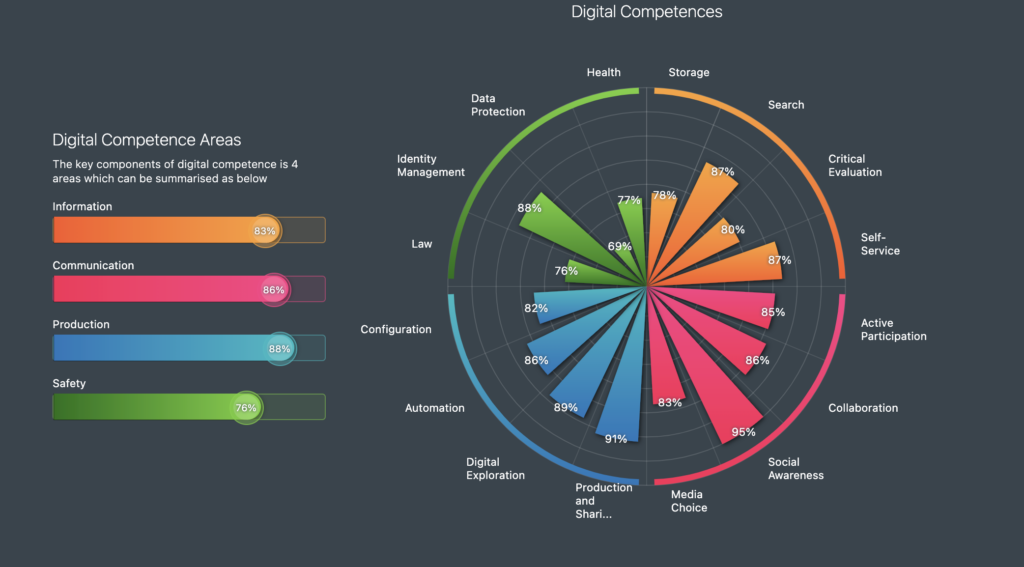
My digital competence areas look like this. Social awareness, Production and sharing and Digital Exploration were my top3. I knew that safety is definitely one of my weaknesses, although I am quite well aware of the things i’m lacking. On the other hand I think that being aware is the most important thing, as that leads to the possibility to change your actions.
What I’ve learned? A lot. Especially the digital competence test was eye-opening as i really need to start paying attention more carefully not only the safety part, but also the health. I am vey advanced user of digital services and products in my everyday life. Digital working environments are very familiar to me, but this course has so far been a very good reminder of all the things related to that.
My comments can be found here:
and here:
February 8, 2025 at 07:26
This was an interesting read! You provided a great overview of various digital services in Finland and how they impact daily life, from social security to travel and commerce. It’s fascinating to see how digitalization has made services more accessible and efficient, yet challenges like the digital divide still persist, especially for older generations. Your insights on price comparisons for booking services were also eye-opening—sometimes going directly to the source is still the best option! I also liked your reflection on UX and accessibility, as ensuring inclusivity in digital services is crucial for everyone to benefit.
February 8, 2025 at 07:55
https://blogi.savonia.fi/tiinakokkonen2
February 24, 2025 at 19:47
Hey, great to see that Booking.com is not cheaper than order hotelroom from hotel internetpage. Many people think that it’s much cheaper. I don’t have ever use Booking.com but I really think that many people use that page. And I live here in countryside, so I don’t use HSL, but I have heard of it. People who have been use it, they say that it’s easy to use and in Helsinki tickets are cheap. I have to use only my own car or if I don’t have a car, I can’t go to work because I have such a long business trip.
February 25, 2025 at 13:27
Thanks for your comment! It’s true that many people assume Booking.com is always the cheapest option, but sometimes better deals can be found on the hotel’s own website too.
And yes, public transport in Helsinki is easy and quite affordable for many, but I totally understand that in the countryside, a car is often the only option. 😊
March 12, 2025 at 07:25
Hello Heta!
Thank you for your blog post! It was nice to read your thoughts and experiences concerning digital solutions.
I live far away from Helsinki, in northern Ostrobothnia but have visited in metropolitan area every now and then. I have used HSL- app only occasionally, so idon´t have experiences from this app on large scale, but when i have used it it has worked quite nicely. It wass interesting to read what are your thoughts on this app, because you obviously have used it much more than i have.
Your thoughts as an UI/UX designer on digital gap were very intereresting. I have years of experience in social and health care, among various customer groups (e.g. elderly people and diabled persons), so i have seen concretely the challenges what digital solutions and vast digital develpoment can cause.
You can find my blogesites here: https://blogi.savonia.fi/hannakielevainen/
Best regards: Hanna
March 28, 2025 at 20:18
Hi Heta!
It was very interesting to read your thoughts about the digital gap especially from your viewpoint, since your work is essential in making sure applications and services are accessible and easy to use.
I also find the HSL app very easy to use and I have used it every time I visit Helsinki. They have really done a good job making the app as user friendly as possible.
May 12, 2025 at 18:23
Hi!
Thanks for mentioning the HSL App and especially the point of view of intuitiveness. I think intuitiveness isn’t talked about enough when designing digital solutions. Of course usability and such is very important but to narrow the digital gap, intuitiveness should always be considered. We humans are intuitive and we need our services to be like that to, be them digital or analog. I caught this point from your article and I thank you for mentioning it!
– Ville (https://blogi.savonia.fi/villejamia/)
May 21, 2025 at 10:19
Hello,
Your blog was interesting to read! I’ve also used Booking.com to book hotels in the past. However, lately I’ve started reserving directly through hotel websites, and often the process is just as easy or even cheaper. I also find it simpler to manage cancellations directly with the hotel rather than going through a third-party service.
I appreciate that you mentioned the HSL app as one of your favorites. I’ve found it convenient and easy to use as well. The only issue I’ve run into is when hosting guests from abroad. They needed a local train ticket without me travelling with them, and unfortunately, there was no option to buy and send a ticket via the app. The only way was to use ticket machines or counter (the old way). I hope to see this change in the future, especially since I recently read that the ticket machines are being removed.
Your work as a UI/UX designer seems super interesting, and your digital competency really shines through. I actually didn’t know what a UI/UX designer does before, so it was great to finally learn more about it – thank you!
Best regards,
Elisa
Feel free to visit my blog too: https://blogi.savonia.fi/elisapirinenocampo/home/
June 4, 2025 at 12:02
Hi Heta-Linnea!
You told about your favorite app, HSL, which sounds like a very convenient app. In Kuopio, public transport is served by buses and we use the Vilkku app, which has at least some of the same features. I find apps like these really good because they give a sense of security when traveling to unfamiliar places. I like to use Google Maps if I need to go somewhere unfamiliar by walking or driving. Life has been made quite easy in this area thanks to apps. In the old days people had to carry paper maps which feels like a strange idea nowadays.
Here is the link to my blog: https://blogi.savonia.fi/maijukarkkainen/
Have a nice summer!
-Maiju
July 27, 2025 at 21:38
Hi,
thank your for diverse post. It gave a good insight about life among digital services in Finland. Our life is really digital with sophisticated online services and apps. Your experince from Booking.com shows well that if some serices makes searching easier for us, it might have a price. Sometimes it is easy to forget, if the app is not publicly funded.
I did like your notices regarding UI, especially Omakanta. It would have been great to know what kind of suggestions you have to make its interface better. I agree – for intansce I find it simple but layout is very official and quite old-fashioned.
July 27, 2025 at 21:40
And here’s the link of my blog so you can visit as well! https://blogi.savonia.fi/tuulioinonen/
July 30, 2025 at 22:58
Hi! Thank you for your well-structured and engaging blog post. I really liked your section about the HSL app! I use it too, and totally agree—it’s super intuitive and quick, especially once you’ve set up your info and payment method.
Also, nice point about how your mom struggles with using it. It’s a good reminder that even well-designed apps can be challenging if someone isn’t used to digital tools.
It was also nice and refreshing to read a blog from a designer perspective because I myself work in a totally different work field.
Thanks for the great insight!
Link to my blog: https://blogi.savonia.fi/noorakolehmainen