
My Work and Digital Tools
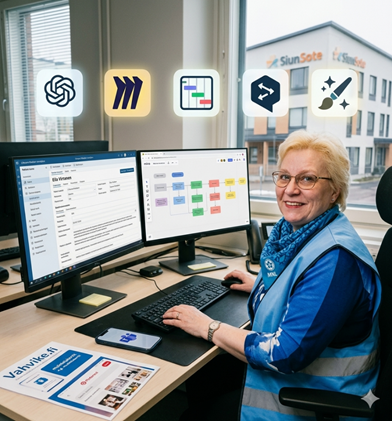
I work as a service supervisor and social counselor in a nursing home for the elderly, which is a unit under Siun sote. My workday is heavily divided between administrative tasks, HR management, planning recreational activities for the residents, and social work. Today, digital tools play a central role in managing this entire entity
Administration and Client Data Management
Currently, we use Mediatri, but later this year we will transition to the Lifecare client and patient information system. I use these systems for documenting residents’ care and service plans, tracking their daily well-being, and maintaining statutory documentation.
The Lifecare patient information system is a comprehensive healthcare solution used by more than half of Finland’s wellbeing services counties. The system reduces administrative workload, streamlines care pathways and workflows, and frees up more time for professionals to focus on face-to-face client encounters. In addition, Lifecare offers powerful knowledge management solutions that allow stored data to be utilized for promoting patient well-being and developing operations.
The transition from Mediatri to Lifecare later this year will certainly mean learning something new for me. Even though both systems serve the same purpose, the user interfaces and documentation methods will change.
Numeron is a shift-scheduling software. As a service supervisor, I use it to create work rosters, track actual hours worked, and manage substitutions and leaves.
Activity Planning and Brainstorming
In my role as a social counselor, I am responsible for supporting the psychological and social functional capacity of our residents.
Vahvike.fi is a “treasure trove” for group leaders and elderly care professionals. I use it to print ready-made materials (such as quizzes, reminiscence cards, and images) or to display them digitally for the residents.
Pinterest serves as a visual search engine where I look for creative ideas for crafts, party decorations, seasonal themes, and sensory exercises.
Google is my go-to general search engine for looking up information, finding local events, or researching historical facts that interest our residents for reminiscence sessions.
Communication and Digital Tools
I use Teams daily for messaging and staying in touch. We hold regular supervisor meetings on Thursdays, and our multidisciplinary team meets via Teams every other Monday. It is a fast and efficient tool for maintaining communication. I also use Outlook email, particularly for sending encrypted messages or when the matter is not urgent.
Finally, I must highlight the use of AI in my work. Tools like Gemini and Copilot help me structure and summarize written text, while Canva is excellent for creating invitations to our nursing home’s events.
Five Selected Tools and How to Utilize Them at Work
ChatGPT
I could use it for drafting texts (such as emails, reports, or social media posts), as a brainstorming partner, and for summarizing complex topics. It works as an excellent tool for overcoming writer’s block.
Miro
This digital whiteboard is a hub for visualization. I could use it for project planning, building process charts, and conducting joint brainstorming sessions with the team, even when we are in different locations.
Monday.com
This serves as the backbone of daily operations and project management. I could use it to track the progress of my own and my team’s tasks, set deadlines, and assign responsibilities to ensure that nothing important gets overlooked.
DeepL
I could utilize this AI-powered translator for fast and fluent text translations (for instance, from Finnish to English or vice versa). It often translates significantly more naturally and professionally than traditional translation tools, saving time in international communication.
DALL-E
I could use this image generator to create unique visual content for presentation materials, blog articles, or social media posts when a suitable stock image cannot be found.
Evaluation of Using Social Media and Digital Tools
The benefits brought by these tools are immense, but their use also involves challenges that must be managed.
Pros (Positive Aspects)
Efficiency and time-saving: Automation, AI, and ready-made project templates eliminate routine tasks, leaving more time for creative and strategic work.
Seamless collaboration: Tools like Miro and Monday enable seamless remote work and keep all team members updated in real time.
Overcoming creative blocks: ChatGPT and DALL-E help break through creative barriers and generate new ideas in a matter of seconds.
Cons (Negative Aspects)
Information overload and interruptions: Continuous notifications and multiple platforms can fragment the workday, increase information overload, and weaken the ability to focus.
Data security and copyright risks: Especially with AI tools (like ChatGPT and DALL-E), one must be careful not to input confidential information or client data.
AI “hallucinations”: AI can produce convincing-sounding but incorrect information, meaning that fact-checking always requires human effort.
Which Tools I Chose and Why?
I chose the following tools: ChatGPT, Miro, Monday, DeepL, and DALL-E.
Why these specific tools?
I selected this specific quintet because together they form a perfect combination. They do not represent traditional, “passive” social media (such as Facebook or entertainment-focused TikTok); instead, they are active tools for specialist and professional work.
This selection covers all areas of modern knowledge work:
Project management (Monday)
Visual collaboration (Miro)
Text generation and writing (ChatGPT)
Breaking down language barriers (DeepL)
Visual content creation (DALL-E)
This combination minimizes manual routine work and maximizes the fluency of communication within the team.
Human Care in Bits? A Service Supervisor and Social Counselor’s Glimpse into the Future of Digital Elderly Care
My daily life in an elderly care home is a constant balancing act between two different worlds. In my role as a service supervisor, my desk is filled with administrative duties, statutory documentation, HR management, and a complex shift-scheduling puzzle. Meanwhile, in my role as a social counselor, my core passion lies in supporting the psychological and social functional capacity of our residents, organizing meaningful daily lives and recreational activities, and working closely in social work with families and networks.
In this comprehensive report, I examine how digital platforms and new AI-powered innovations intertwine with public social and healthcare services. How do our current core functions connect with emerging technologies, and can five modern professional tools—ChatGPT, Miro, Monday, DeepL, and DALL-E—truly streamline the daily operations of a nursing home and free up more time for what matters most: genuine, face-to-face encounters with our residents?
Our Current Digital Ecosystem in the Nursing Home
Before we turn our eyes to the future, it is important to understand where we stand right now. Management and client data management in a nursing home require absolute precision. Currently, our daily operations revolve around the Mediatri system, but we are living in exciting times: later this year, our Siun sote unit will transition to the Lifecare client and patient information system.
Lifecare is a massive, comprehensive solution used by more than half of Finland’s wellbeing services counties. Its promise is substantial: to reduce administrative workload, streamline care pathways and workflows, and—above all—free up more time for us professionals to focus on face-to-face client encounters. It also offers knowledge management
tools that allow stored data to be utilized for promoting residents’ well-being and developing the quality of operations. In practice, the transition from Mediatri to Lifecare means a significant learning curve for me as a service supervisor. Even though both programs serve the same statutory purpose (care and service plans, daily documentation, and monitoring well-being), the user interfaces and logging practices will change. Alongside this runs the Numeron shift-scheduling software, which I use as a service supervisor to balance optimized work rosters, track actual hours worked, plan annual leaves, and manage sudden substitution needs.
At the same time, activity planning and brainstorming in my role as a social counselor require a completely different kind of digital toolkit. In this work, Vahvike.fi is a true treasure trove for practical nurses and elderly care professionals, from which I print or digitally display quizzes, reminiscence cards, and images for the residents. When ideas need a visual boost for party decorations, sensory exercises, or seasonal themes, I turn to Pinterest. Google, on the other hand, serves as a general search engine for looking up historical facts from past decades for our residents’ reminiscence sessions. Communication and multidisciplinary cooperation are centralized in Teams, where we meet with other supervisors on Thursdays and as a multidisciplinary team every other Monday, whereas data-secured matters and less urgent messages are handled via Outlook email.
In addition to this, AI has already crept into our daily routines: Gemini and Copilot help me structure and summarize complex administrative texts, and with Canva, I conjure up visual, clear invitations for our nursing home’s events and celebrations.
Five New Tools – How Do They Fit into the Daily Routine of a Nursing Home?
ChatGPT
Although I already use Gemini and Copilot to some extent, ChatGPT expands the possibilities, especially for brainstorming in my role as a social counselor and for communication as a service supervisor.
I could use it to draft various internal bulletins, letters to relatives, or social media posts highlighting news from the nursing home. When faced with writer’s block—for example, when having to formulate a tactful yet clear guideline regarding nursing home visiting policies—ChatGPT shapes my raw draft into a friendly and professional text in seconds. It also serves as an excellent brainstorming partner for planning themed weeks for the residents.
Miro
As our extensive wellbeing services county, Siun sote, changes and evolves, development work is often conducted across unit boundaries. The Miro digital whiteboard brings a new boost to this collaboration.
I could use Miro for project planning and building process charts when we are preparing for the rollout of Lifecare, for example. Even if we are located in different offices, my team and I can build a shared visual board illustrating how the new documentation routines will be organized in our unit, who will be responsible for each training session, and what the critical deadlines are. It replaces traditional flipcharts and saves collective ideas directly to the cloud in a digital format.
Monday.com
Daily life in a nursing home is packed with details to remember: residents’ doctor appointments, care plan updates, student mentoring periods, audit preparations, and recreational event days.
Monday.com could serve as the backbone of daily operations and project management. I could create a shared tracking platform for myself and the team, allowing us to see at a glance, for instance, the update status, assigned responsibilities, and deadlines for residents’ statutory care and service plans. As a task moves from one stage to another, Monday.com keeps everyone in the loop without the need to send separate emails.
DeepL
The labor shortage in the healthcare sector is a reality, and nursing homes are increasingly employing staff from international backgrounds. There may also be foreign-language speakers among the residents and their families. In our workplace, we have three Filipino practical nurses and one Namibian practical nurse apprentice.
I could utilize the AI-powered DeepL translator for fast and highly fluent text translations from Finnish to English or vice versa. Because DeepL translates significantly more naturally and professionally than old, traditional translators, I can use it to ensure that complex workplace guidelines or onboarding materials, for example, are translated for our international staff in a completely understandable way, without the risk of misunderstandings
DALL-E
While Vahvike.fi and Pinterest are fantastic, there are times when we need something highly specific in terms of visual material that cannot be found ready-made.
I would utilize the DALL-E image generator to create unique visual content for purposes like reminiscence sessions or our nursing home’s own event invitations. For example, if we are setting up a sensory room or a reminiscence session for the residents themed around a “1950s countryside landscape,” I can ask DALL-E to generate a specific, nostalgic, and gentle image. We can then project this onto the wall or print it out to serve as a conversation starter.
A Critical Evaluation of Using Social Media and Digital Tools
Technology is never merely a neutral tool; it always carries its own downsides and well-intentioned pitfalls, particularly in sensitive sectors such as social and healthcare services for the elderly.
Pros (Positive Aspects)
Automation, AI, and ready-made project templates (such as Monday.com or ChatGPT) eliminate tedious and repetitive routine tasks, such as drafting texts from scratch or polishing emails. This saves valuable time that I, as a service supervisor and social counselor, can redirect straight into face-to-face client encounters and being present for our residents.
Tools like Miro and Monday keep all team members—doctors, physiotherapists, nurses, and social counselors—updated in real time. Information is no longer confined to a single person’s notes; instead, it is accessible to everyone on a shared platform.
ChatGPT and DALL-E help generate new ideas in a matter of seconds. When ideas for recreational activities begin to run out after a long winter, AI offers fresh perspectives and ready-to-use material in an instant.
Cons (Negative Aspects)
Constant notifications, Teams messages, Outlook emails, and new platforms can fragment the workday. If phones and computers are constantly beeping, the ability to focus during sensitive social work encounters that require deep trust will suffer. In care work, interruptions are a safety risk.
Extreme data security and copyright risks constitute the most critical point in the social and healthcare sector. Patient records or residents’ personal data must never be inputted into open AI tools like ChatGPT or DeepL. As a service supervisor, I must be ironclad in ensuring that all client data remains strictly within Mediatri, Lifecare, and secure Outlook. AI can only be used for general-level brainstorming and text formatting—never for documenting real cases.
AI can produce highly convincing-sounding but entirely incorrect information (“hallucination”). If I ask AI to look up facts for a historical reminiscence session, the information must always be verified via Google or other reliable sources before being presented to the residents. The human eye and professional critical judgment cannot be replaced.
Strategic Selection Criteria – Why These Specific Tools?
When considering which tools I chose and why, the answer stems directly from the quality requirements of specialist and professional work. More entertainment-oriented social media channels, such as TikTok, Snapchat, or Jodel, could have been selected from the list, but they fit poorly into the daily routine of a nursing home for the elderly. As for Facebook, it does not offer the necessary tools for improving professional workflows and processes.
I selected this specific quintet—ChatGPT, Miro, Monday.com, DeepL, and DALL-E—because together they form a perfect, modern productivity ecosystem. They do not represent traditional, “passive” social media, where users merely consume entertainment content created by others; instead, they are active tools used to generate added value.
This selection covers all areas of modern knowledge work and administration:
Project management and process tracking (Monday.com) – keeps the Lifecare transition and care plans on schedule.
Visual collaboration (Miro) – helps the multidisciplinary team develop its operations together across unit boundaries.
Text generation and writing (ChatGPT) – eases the service supervisor’s extensive reporting and communication workload and eliminates writer’s block.
Breaking down language barriers (DeepL) – supports our international work community during onboarding and daily communication.
Visual content creation (DALL-E) – enriches the residents’ recreational activities and brings memories to life with unique images.
This carefully considered combination minimizes manual routine work and maximizes the fluency of communication within our work community. Digital tools will never replace the warmth that a nurse or a social counselor offers a resident, but they can clear away the administrative jungle to make more room for that warmth during the workday.
Short Self-Assessment
I feel that I have a good command of the digital tools used in my work and know how to utilize them effectively both in administrative tasks and in work that supports the well-being of our residents. Daily, I use client and patient information systems, shift-scheduling software, as well as communication and collaboration tools. Additionally, I leverage various online services and AI solutions for information retrieval, brainstorming, and content creation.
I consider my strengths to be a positive attitude toward new technologies and a strong desire to develop my own expertise. The upcoming transition to the Lifecare system offers a great opportunity to learn something new and develop even more efficient ways of working. At the same time, I am fully aware of the challenges associated with using digital tools, such as data security, data privacy, and evaluating the reliability of information generated by AI.
My goal is to continue developing my digital skills so that technology seamlessly supports workflow fluency and frees up more time for what is most essential in my work: meaningful face-to-face encounters with the elderly and promoting their well-being.